jae_63 has asked for the wisdom of the Perl Monks concerning the following question:

Hi,

I just moved to a new company, and would like to be able to use a decent debugger, preferably a graphical debugger, from the Mac on my desktop to a remote Linux system.

I’ve familiar with Devel::ptkdb, and this is my debugger of choice for this sort of work, and I was able to install it on the Linux system. But at least “out of the box” this isn’t a workable solution for much of the work, which involves creating lots of unit tests. These unit tests are implemented in a local set of modules, which are built around Test::More.

Due to the nature of Test::More and its brethren, and their heavy use of eval(), it’s not so easy to debug these unit tests using a debugger. Routinely such tests are invoked using a local script named runtests.pl, with command-line arguments include the unit test file, such as mytest.t. But since the debugger won’t know about mytest.t when the debugger is invoked, there is no obvious way to set breakpoints within the test.

I tried using Enbugger within my .t file (although a solution which wouldn’t require me to edit the .t file for the purpose of adding debugging functionality would be highly desirable), but this didn’t work quite right, even using Enbugger’s default, which is the default Perl debugger. This is because the test suite captures a lot of standard output and standard errors (including what perldb might generate), so much of the meaningful output is delayed until after I manually quit the editor,

Enbugger supports a few Perl debuggers, but doesn’t support Ptkdb; there is a stub for Ptkdb which makes it clear that the Enbugger developer thought about Ptkdb, but didn’t get around to it.

I’m open to the idea of using a different graphical debugger such as ddd (which in the Perl context is a wrapper around perldb), but even ddd would (I think) have trouble with the suppressed-data described above.

I'm also open to trying trepan, which is supported by Enbugger, but am having trouble installing it, and am generally unfamiliar with it, and also have my doubts as to whether it would work in this challenging context.

Has anyone come up with a solution to this problem? Or do you just accept that Unit Tests need to be debugged the old fashioned way, with print statements?

Thanks …

  • Comment on graphical debugger, in a unit-test environment?

Replies are listed 'Best First'.
Re: graphical debugger, in a unit-test environment?
by Laurent_R (Canon) on Jan 10, 2015 at 00:24 UTC
    Hmm, you seem to know more about the subject than I do, or perhaps I did not really understand your question. In addition, I do not know if what I'm going to say is useful or relevant. But I would still submit that, in my opinion, debugging and testing are two distinct activities, aimed at different purposes. Testing is aimed at checking that the result of your program is correct, while debugging is aimed at understanding why the result is not what you expect.

    Having said that, I am doing quite often something completely different. Very often, the first thing I am doing with a new (or modified) program is to run it under the debugger, in order to verify that variables are populated with what I expect, that the data structure has the right format, that the program is folloging the expected path, etc. But that's just a short cut th get quicker to the result.

    But the crux of the matter is still that testing and debugging are two very different activities.

    In the end,

    Je suis Charlie. I am Charlie.

      I agree that debugging and testing are very different activities. Still, tests, themselves, may need to be debugged.

      As for my comment about using print statements to debug tests, often understanding a test failure involves co-debugging the application and test at the same time. For that matter, the initial debugging of the tests is almost certainly co-debugging with the application. Therefore, having the tests output debugging information helps both with testing the application and with debugging the tests.

Re: graphical debugger, in a unit-test environment?
by Anonymous Monk on Jan 09, 2015 at 22:59 UTC

    Have you tried Devel::ebug?

    Or do you just accept that Unit Tests need to be debugged the old fashioned way, with print statements?

    That is like the most advanced way :) otherwise you're debugging all manner of debuggers

Re: graphical debugger, in a unit-test environment?
by RonW (Parson) on Jan 09, 2015 at 23:37 UTC
    Or do you just accept that Unit Tests need to be debugged the old fashioned way, with print statements?

    In my experience, the test's debugging output is also useful after the test has been debugged. So, I design them in from the start.

    (Besides, you can never be sure the debugging is complete.)

Re: graphical debugger, in a unit-test environment?
by belden (Friar) on Jan 15, 2015 at 17:50 UTC
    I've got some familiarity with this. I'll try not to ramble.

    First, you've got a test runner (runtests.pl) and you've got your test files (foo.t). It sounds like you want to attach a debugger to foo.t - whether you go through your test runner or not is probably uninteresting to you, since it's the test that you want to debug, not the test runner.

    So a good thing to check is this: can you just run foo.t from the command line? "perl path/to/foo.t" should run the test for you. Maybe you need to specify a PERL5LIB, or use -I, to pick up project libraries. Once you've got your test running from the command line, outside of the debugger, then you can set it up to run under a debugger.

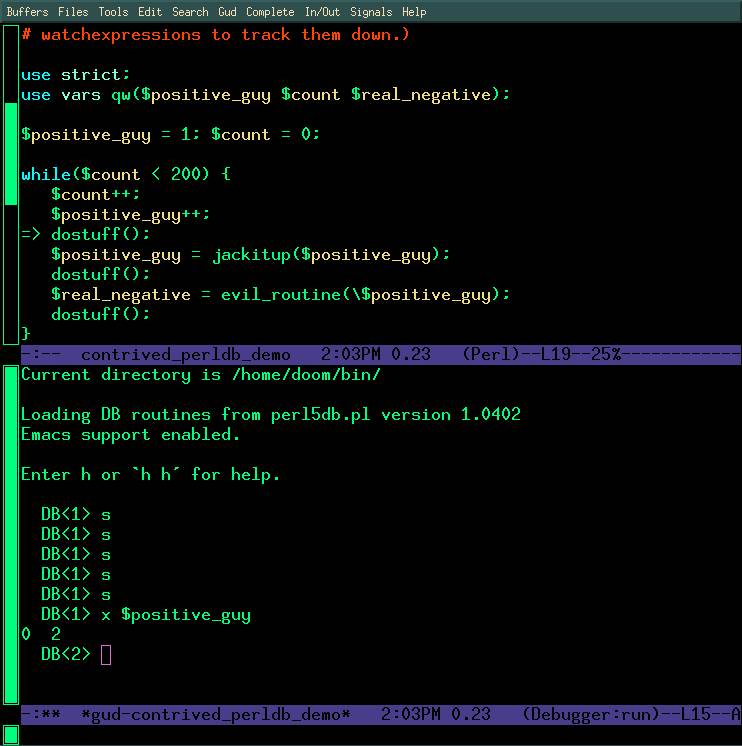
    If you and I worked together, I'd sidestep part of your problem - which is that you want a debugger application on your Mac to connect to a remote debugging session on some Linux box. What I would do is: fire up emacs within the console (emacs -nw path/to/foo.t), set the filetype to perl (escape-x cperl-mode), and run the file under the debugger (escape-x perldb). Here's a screenshot of emacs debugging perl - this is pretty close to what I would see at this point: http://obsidianrook.com/devnotes/talks/perl_debugger/Images/emacs_perldb_big_color_screen.jpg

    Obviously if you're not familiar with emacs then this is probably not a great solution for you. There is a VimDebug project, which claims to allow attaching vim to a perl debug session, but I've never gotten it to work for myself, though frankly I haven't tried much.

    But where we are now is that you can run your test from the command line. And you can add the -d switch to your "run this test script" command line to enter into the unexceptional stock perl5db.pl interface. You should try that on your Linux dev server, just to ensure the next step will work.

    Now what you need to do is:

    - fire up the debugger on the remote server

    - somehow attach a debugger from your Macbook to the remote debugging session

    Komodo IDE comes with a remotely attachable perl5db.pl. Have a look at http://docs.activestate.com/komodo/4.4/debugperl.html and http://komodoide.com/download/ to find docs on how to start up the remote debugger on your Linux server, and to download Komodo to your Macbook.

    Hope this helps. Getting your test running from the command line first, outside of your test runner; then getting the command line debugger to work, are both good first steps before you try the remote debugger attachment.

    I'm more likely to see a reply on twitter (@belden) than here, ping me there if you have more questions on this thread.