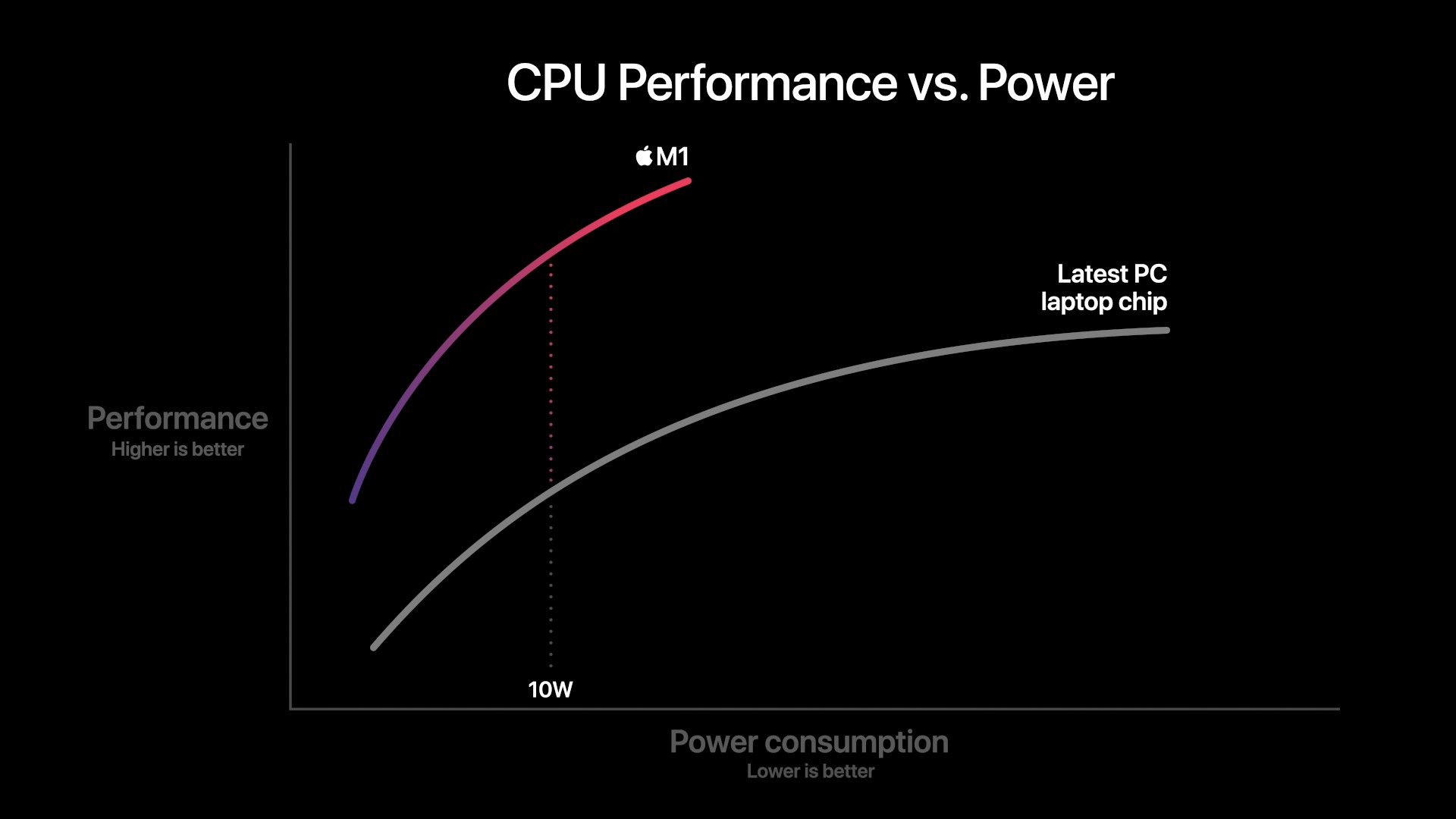
See for example Apple slide on Anantech
Nicely drawn, but technically, the information content is close to zero. This is the kind of graphics you use to separate people with too much money and too little knowledge from their money.
What information can we gain from the image?
Quite obviously, the "Apple M1" is compared against the "latest PC laptop chip".
According to the file name of the image, it is from November 2020, before the M1 Pro, M1 Max, and M1 Ultra were released. So this is old news, Apple, AMD and Intel have released new hardware with different power consumption and performance since then. If you want to test performance, you need to use hardware from November 2020, not from 2022.
Comparing apples and oranges: The apple is clear, it's the original Apple M1. But what is the orange, the "latest PC laptop chip" in November 2020? Intel or AMD? Which model? There is simply no information in the image.
Comparing apples and oranges, again: The Apple M1 is a System-on-a-chip, combining the CPU cores, lots of peripherals, and even the main RAM on the same chip. (Technically, the RAM is a sepearate chip on the same carrier.) This is more like a smartphone or tablet design and less like a PC/Laptop design. PCs, including laptops, keep the RAM separate, a lot of peripherals are in the south bridge of the chipset, older designs have CPU, memory and fast bus systems connected to the north bridge. Modern designs moved the memory controller from the north bridge to the CPU. Also, PCs still have lots of legacy hardware, including an LPC (low pin count) bus that looks and feels like a classic ISA bus to all software. Which parts are included in the power consumption, which are excluded?
The X axis: We have exactly one X value, 10 W. Both the M1 and the "latest PC laptop chip" consume 10 W, or less, or more. How much less? How much more? We can't know, there is no second X value. We don't know if the X asis starts at 0 or some other value. Mathematically, it should start at 0, but in the real world, X and Y axes may have an offset. We can perhaps guess that the X asis starts at 0, because neither M1 nor the "latest PC laptop chip" have any performance at x=0. But we can't even guess where M1 or "latest PC laptop chip" power consumption start or end, because we don't now if the X asis is linear, logarithmic, exponential, or some other scaling. With some creative scaling, the top consumption of the two chips might differ only in a few Milliwatts, or by Kilowatts if scaled differently
The Y asis: No Y values at all, not even a unit, like Floating point operations per second, Integer operations per second, benchmark points, whatever. This is even worse than the X axis. All problems of the X axis also apply. Unknown scaling, unknown origin. Again, with some creative scaling, the difference between the two chips might be down in the noise floor, or astronomic.
Alexander
In reply to Re^5: Perl regex speed
by afoken
in thread Perl regex speed
by malaigo
| For: | Use: | ||
| & | & | ||
| < | < | ||
| > | > | ||
| [ | [ | ||
| ] | ] |