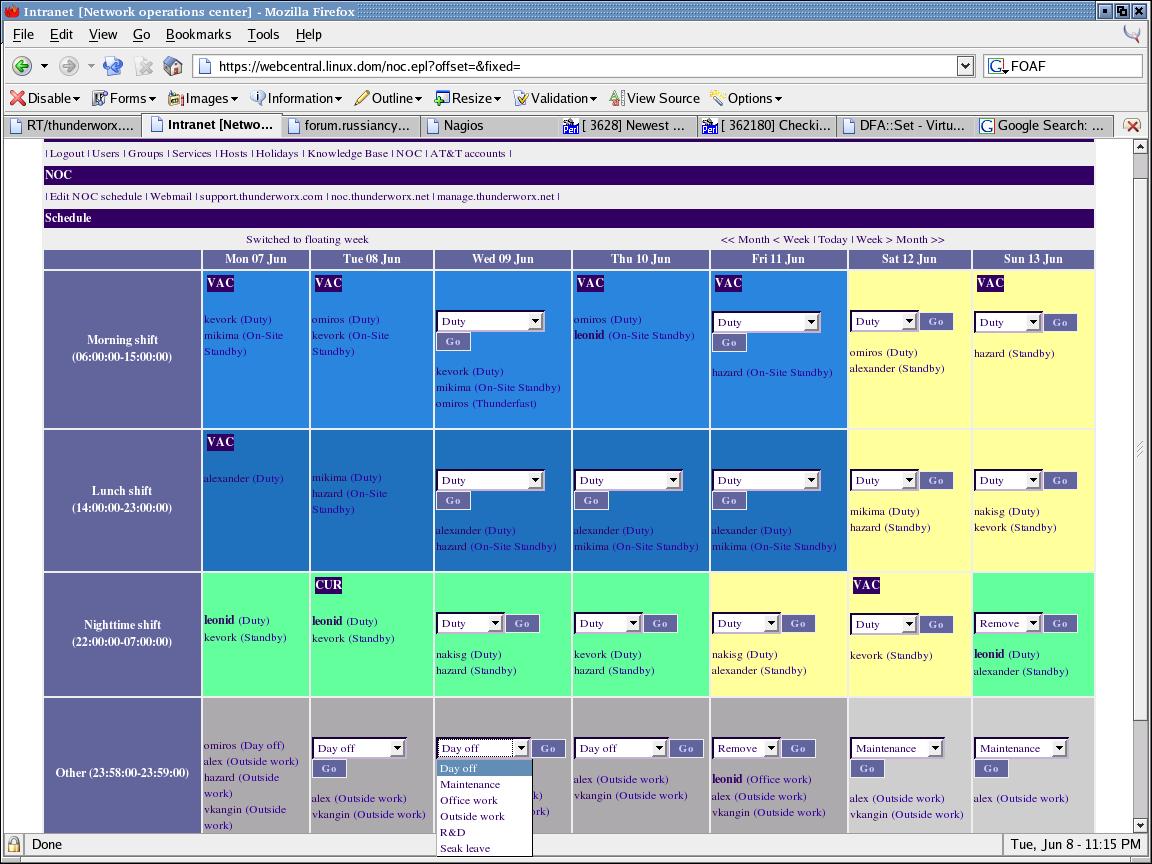
Problem: generate and display a complex interface/menu, which varies from user to user and depends on a number of options. There are plenty of conditions to check and there are multiple combinations of conditions that can produce the same result. The number of conditions and their combinations can grow and change over time. Heh, even describing this is complex. :)
Example:
if ($not_in_shift) { if ($current || !$past) { print "Register for shift\n"; } } else { if ($current) { print "Confirm in shift\n"; print "Remove from shift\n"; } if ($past) { print "Confirm in shift\n"; } }
Even as it is, it already looks ugly. Adding few more conditions and combinations brings code to a real mess and makes it unmaintainable.
Solution: first the code, then explanation.
#!/usr/bin/perl -w use strict; # These can be filled by some function my %conditions = ( Current => 1, Not_in_shift => 1, Past => 0, ); # Menu item to print if any set of conditions satisfies my %menu = ( 'Add Self' => [ "Current,Not_in_shift", "!Past,Not_in_shift", ], ); # No need to touch this stuff ever for my $item ( keys %menu ) { for my $set ( @{$menu{$item}} ) { my $result = 1; for my $condition ( split(/,/,$set) ) { # Negating condition is a convenient thing to have if (substr($condition,0,1) eq '!') { substr($condition,0,1,''); ($result &&= !$conditions{$condition}) || last; } else { ($result &&= $conditions{$condition}) || last; } } if ($result) { add_menu_item($item); last; } } } # Whatever we want to do with the menu item sub add_menu_item { my $item = shift; print "$item\n"; }
Basically, here we have a %conditions hash that contains the current status. It can be updated by a separate function. %menu contains all menu items that can be displayed. For each item, there is a list of combinations (strings). Each combination lists conditions that must true (or false, with negation) to satisfy. Any combination that satisfies all conditions causes the menu item to appear.
The good side of this solution is that it is obvious under which conditions which menu item will get displayed. It is easy to add more items, edit or delete existing ones, or temporarily hide menu items. Chances of making a mistake are lower and it is also possible to store the whole thing outside the code (like in the database or config file) and provide GUI menu editing functionlity. The possibilities are endless. :)
Update: One picture is a thousand words. Here is a screenshot from the running system.
In reply to Checking lots of conditions...ORed and ANDed by TVSET
| For: | Use: | ||
| & | & | ||
| < | < | ||
| > | > | ||
| [ | [ | ||
| ] | ] |