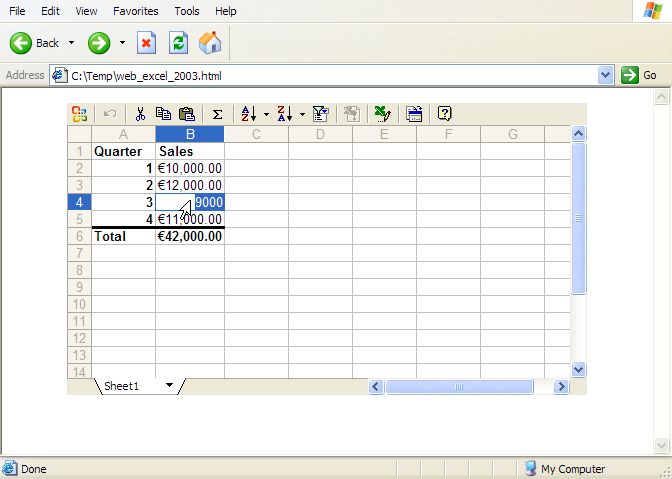
MS Office Web Components are lightweight COM versions of parts of the MS office suite. The user doesn't require an MS Office licence to install them.
The spreadsheet web page is created by embedding an Excel XML file in a Html file as shown below.
If the user has Excel installed they can edit the spreadsheet and save it. If they don't have it installed they can still view it via a web component plugin.
Needless to say this is specific to Internet Explorer (and probably Windows). I'm not advocating this, I'm just showing how it can be done.
Here are examples of the page generated by the code below for Excel 2002 and Excel 2003. For interested parties without IE here is a screenshot of the resulting file (note cell B4 is being edited).
#!/usr/bin/perl -w # Create a MS Spreadsheet Web Component based Spreadsheet. # This is basically a ExcelXML document embedded in a html document. # Only works with MSIE. # # reverse('©'), April 2005, John McNamara, jmcnamara@cpan.org use strict; use Spreadsheet::WriteExcelXML; # Write the ExcelXML spreadsheet to a scalar. open my $fh, '>', \my $xml_str or die "Failed to open filehandle: $!"; # Create a simple Spreadsheet::WriteExcelXML spreadsheet. my $workbook = Spreadsheet::WriteExcelXML->new($fh); die "Couldn't create new Excel file: $!.\n" unless defined $workbook; my $worksheet = $workbook->add_worksheet(); my $bold = $workbook->add_format(bold => 1); my $currency = $workbook->add_format(num_format => '$#,##0.00'); my $total1 = $workbook->add_format(bold => 1, top => 6); my $total2 = $workbook->add_format(bold => 1, top => 6, num_format => '$#,##0.00'); $worksheet->write('A1', 'Quarter', $bold ); $worksheet->write('A2', 1, $bold ); $worksheet->write('A3', 2, $bold ); $worksheet->write('A4', 3, $bold ); $worksheet->write('A5', 4, $bold ); $worksheet->write('A6', 'Total', $total1); $worksheet->write('B1', 'Sales', $bold ); $worksheet->write('B2', 10000, $currency); $worksheet->write('B3', 12000, $currency); $worksheet->write('B4', 9000, $currency); $worksheet->write('B5', 11000, $currency); $worksheet->write('B6', '=SUM(B2:B5)', $total2 ); $workbook->close(); # Escape the XML characters in the ExcelXML file. for ($xml_str) { s/&/&/g; s/</</g; s/>/>/g; s/"/"/g; # " s/\r/ /g; s/\n/ /g; } # Insert the ExcelXML code into a Html doc using a simple template. # Use HTML::Template or the Template::Toolkit for real applications. # my $excel_version = 2003; my $clsid; $clsid = "CLSID:0002E541-0000-0000-C000-000000000046" if $excel_versio +n == 2002; $clsid = "CLSID:0002E559-0000-0000-C000-000000000046" if $excel_versio +n == 2003; my $template = do {local $/; <DATA>}; $template =~ s/__EXCEL_XML_DATA__/$xml_str/; $template =~ s/__SPREADSHEET_CLSID__/$clsid/; $template =~ s/__EXCEL_VERSION__/$excel_version/; print $template; __END__ <html xmlns:o="urn:schemas-microsoft-com:office:office" xmlns:x="urn:schemas-microsoft-com:office:excel" xmlns="http://www.w3.org/TR/REC-html40"> <body> <div id="Spreadsheet" align=center x:publishsource="Excel"> <object id="Spreadsheet" classid="__SPREADSHEET_CLSID__"> <param name=DisplayTitleBar value=false> <param name=Autofit value=true> <param name=DataType value=XMLData> <param name=XMLData value="__EXCEL_XML_DATA__"> <p> To use this Web page interactively, you must have +Microsoft® Internet Explorer 5.01 Service Pack 2 (SP2) or lat +er and the Microsoft Office __EXCEL_VERSION__ Web Compone +nts. </p> <p> See the <a href="http://r.office.microsoft.com/r/r +lidmsowcpub?clid=1033&p1=Excel"> Microsoft Office Web site</a> for more information +. </p> </object> </div> </body> </html>
In reply to Create an interactive Excel web page by jmcnamara
| For: | Use: | ||
| & | & | ||
| < | < | ||
| > | > | ||
| [ | [ | ||
| ] | ] |