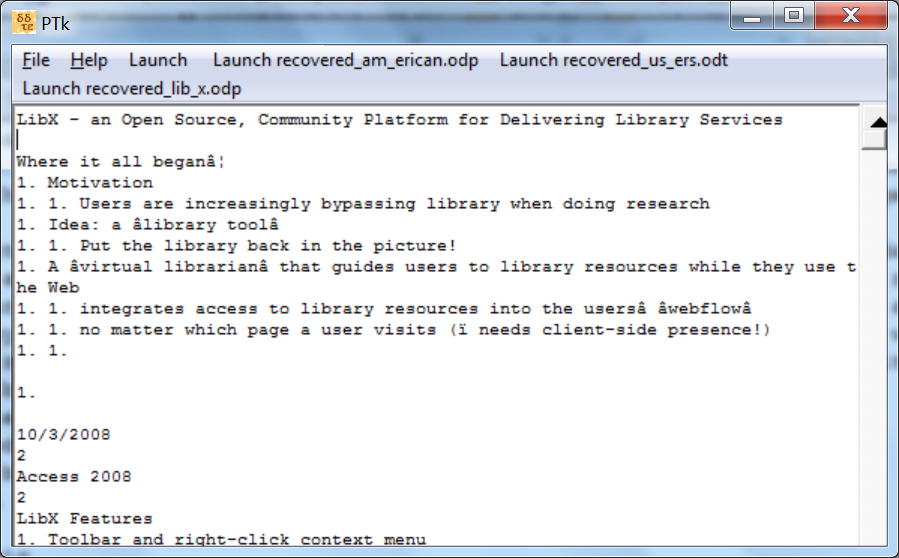
I'm trying to give a place where the user can launch the recovered version of the file. The salvaged text is right in front of them in the text area. The button is to launch the recovered version which might have the formatting too.

The recovery process is different from the text salvaging. The text salvaging is done by a command line app. The recovery version is created by unzipping the Open Office File and replacing one of the XML files with a simplified version and then rezipping all the XML files back into an Open Office file again. Sometimes this allows for recovery after file corruption.

Here's a screenshot.


In reply to Re^2: Can't Erase Previous Menu Button by socrtwo
in thread Can't Erase Previous Menu Button by socrtwo

Title:
Use:  <p> text here (a paragraph) </p>
and:  <code> code here </code>
to format your post, it's "PerlMonks-approved HTML":


  • Posts are HTML formatted. Put <p> </p> tags around your paragraphs. Put <code> </code> tags around your code and data!
  • Titles consisting of a single word are discouraged, and in most cases are disallowed outright.
  • Read Where should I post X? if you're not absolutely sure you're posting in the right place.
  • Please read these before you post! —
  • Posts may use any of the Perl Monks Approved HTML tags:
    a, abbr, b, big, blockquote, br, caption, center, col, colgroup, dd, del, details, div, dl, dt, em, font, h1, h2, h3, h4, h5, h6, hr, i, ins, li, ol, p, pre, readmore, small, span, spoiler, strike, strong, sub, summary, sup, table, tbody, td, tfoot, th, thead, tr, tt, u, ul, wbr
  • You may need to use entities for some characters, as follows. (Exception: Within code tags, you can put the characters literally.)
            For:     Use:
    & &amp;
    < &lt;
    > &gt;
    [ &#91;
    ] &#93;
  • Link using PerlMonks shortcuts! What shortcuts can I use for linking?
  • See Writeup Formatting Tips and other pages linked from there for more info.