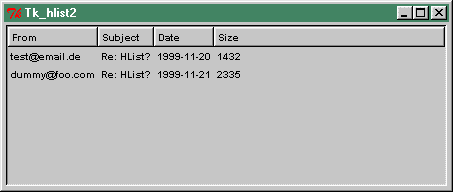
Here is an example for HList:
use Tk;
use Tk::HList;
$top = new MainWindow;
$hlist = $top->Scrolled("HList",
-header => 1,
-columns => 4,
-scrollbars => 'osoe',
-width => 70,
-selectbackground => 'SeaGreen3',
)->pack(-expand => 1, -fill => 'both');
$hlist->header('create', 0, -text => 'From');
$hlist->header('create', 1, -text => 'Subject');
$hlist->header('create', 2, -text => 'Date');
$hlist->header('create', 3, -text => 'Size');
$hlist->add(0);
$hlist->itemCreate(0, 0, -text => "test\@email.de");
$hlist->itemCreate(0, 1, -text => "Re: HList?");
$hlist->itemCreate(0, 2, -text => "1999-11-20");
$hlist->itemCreate(0, 3, -text => "1432");
$hlist->add(1);
$hlist->itemCreate(1, 0, -text => "dummy\@foo.com");
$hlist->itemCreate(1, 1, -text => "Re: HList?");
$hlist->itemCreate(1, 2, -text => "1999-11-21");
$hlist->itemCreate(1, 3, -text => "2335");
MainLoop();
You can leave some column values blank for hierachical purpose.
And here is how it looks like: link
Here is an other example, not fine, but with hierachical structure:
#!/usr/bin/perl
use strict;
use warnings;
use diagnostics;
use Tk;
require Tk::HList;
my $top = MainWindow->new(-title=>"FileSelector");
my $h = $top->Scrolled('HList',
-drawbranch => 1,
-separator => '/',
-indent => 15,
-command => \&show_or_hide_dir,
)
->pack(-fill => 'both',
-expand => 'y',
);
my $xpm = <<'END';
/* XPM */
static char *test[]={
"32 32 11 1",
". c None",
"# c #000000",
"h c #004000",
"g c #004040",
"f c #404000",
"e c #808080",
"i c #a0a0a4",
"c c #c0c000",
"d c #ffff00",
"b c #ffffc0",
"a c #ffffff",
"................................",
"................................",
"................................",
"................................",
".............#....###...........",
"............#a##.#aba##.........",
"...........#aaaa#aaaaaa##.......",
"..........#aaaa#aaaaaaaba##.....",
".........#aaaa#aaaaaaaaaaab##...",
"........#aaba#aaaaaaabaabaaaa##.",
".......#aaba#baaaaa#baaaaaabaaa#",
"......#aaaa#aaaaab#a##baaaaaaa#.",
".....#aaba#aacbba#aaaa##baaab#..",
"....#bbaa#abaacc#aaaaaaa##aa#...",
"...#bbbb#aaabaa#aaabaaaaaa##....",
"..#bbbb#bacaaa#aaaaaaaabaaaa##..",
".#bbbb#bbaacc#aacaaaaaaaaaaaba#.",
"#ddbb#bbbbba#aaaaccaaaaaaaaaaaa#",
"#edddfgcbbbfaacaaaaccaaaaaaaaa#e",
".#hedddfhcfabaaccaaabccaaaaaa#e.",
"...##edddhaacbbaaccbaaaccaab#i..",
".....##e#baaaccabaaccbaabaa#i...",
"......##bacbaabccbaaaccabb#e....",
"......#bbbbccaabbccaaaaab#i.....",
".....#bbbbbbbccabbaccaab#i......",
".....#ebbbbbbbbccbaabba#i.......",
"......##ebbbbbbbbccaabhe........",
"........##ebbbbbbbbbb#e.........",
"..........##ibbbbbbbhe..........",
"............##ebbbb#e...........",
"..............#hee#i............",
"................##i............."};
END
my %icons;
#$icons{"open"} = $top->Bitmap(-file => './open_folder.xbm');
#$icons{"closed"} = $top->Bitmap(-file => './folder.xbm');
$icons{"open"} = $top->Pixmap(-data => $xpm);
$icons{"closed"} = $top->Pixmap(-data => $xpm);
#show_or_hide_dir("c:\\programme");
show_or_hide_dir(@ARGV);
#show_or_hide_dir("p:");
#show_or_hide_dir("/temp");
MainLoop();
#---------------------------------------------------------------------
+--
sub show_or_hide_dir {
my $path = $_[0];
print "PATH:".$path;
return if (! -d $path);
if ($h->info('exists', $path)) {
my $next_entry = $h->info('next', $path);
if (!$next_entry || (index ($next_entry, "$path/") == -1)) {
$h->entryconfigure($path, '-image' => $icons{"open"});
add_dir_contents($path);
my $path1 = $path;
my $path2 = $path;
my @du = ("du", "-b", "-h", $path1, $path2);
my $dirSize = system(@du) == 0 or die "system @du failed:
+$?";
}
else {
$h->entryconfigure($path, '-image' => $icons{"closed"});
$h->delete('offsprings', $path);
}
}
else {
die "'$path' is not a directory\n" if (! -d $path);
$h->add($path,
-itemtype => 'imagetext',
-image => $icons{"open"},
-text => $path,
);
add_dir_contents($path);
}
}
sub add_dir_contents {
my $path = $_[0];
my $oldcursor = $top->cget('-cursor');
$top->configure(-cursor => 'watch');
$top->update();
my @files = <$path/*>;
foreach my $file (@files) {
$file =~ s|//|/|g;
#$file =~ /^\s*$/;
print "FILE:".$file."\n\n";
(my $text = $file) =~ s|^.*/||g;
if (-d $file) {
$h->add($file,
-itemtype => 'imagetext',
-image => $icons{"closed"},
-text => $text,
);
}
else {
$h->add($file,
-itemtype => 'text',
-text => $text,
);
}
}
$top->configure(-cursor => $oldcursor);
} # sub add_dir_contents
Here is a possible solution:
#!/usr/bin/perl
use strict;
use warnings;
use Tk;
use Tk::HList;
my @data;
while (<DATA>) {
next if m~^\s*$~;
my ($bu, $gn, $fu) = split /,/;
s~^\s+|\s+$~~g for ($bu, $gn, $fu);
push @data, {business_unit => $bu,
group_name => $gn,
functions => $fu,
};
}
@data = sort { $a->{business_unit} cmp $b->{business_unit}} @data;
my $top = new MainWindow;
my $hlist = $top->Scrolled("HList",
-header => 1,
-columns => 4,
-scrollbars => 'osoe',
-width => 70,
-selectbackground => 'SeaGreen3',
)
->pack(-expand => 1,
-fill => 'both',
);
{
my $count = 0;
for my $key (qw/business_unit group_name functions/) {
$hlist->header('create', $count++, -text => $data[0]->{$key});
}
}
{
my $count = 0;
my $old = '';
for my $d (@data[1..$#data]) {
$hlist->add($count);
if ($old ne $d->{business_unit}) {
my $count2 = 0;
for my $key (qw/business_unit group_name functions/) {
$hlist->itemCreate($count, $count2++, -text => $d->{$k
+ey});
}
}
else {
my $count2 = 1;
for my $key (qw/group_name functions/) {
$hlist->itemCreate($count, $count2++, -text => $d->{$k
+ey});
}
}
++$count;
$old = $d->{business_unit};
}
}
MainLoop();
__DATA__
Dept, Group, Function
IT, Projects, SAN/NAS,
IT, Development, GUI,
IT, Security,
HR, Admin, West
HR, Management, West
Legal, Admin, FirmWide,
Legal, Compliance,
|