I'm slowly piecing together a 2D game engine in Perl and have run into the need of a module to handle tile sets. Seeing that there was no such module on CPAN, I wrote one myself.
I'm calling it Image::Tileset and it uses Image::Magick and XML::Simple.
It works like this: you have a tileset image (probably a PNG, possibly one with transparency or alpha channels), and then you have an XML document, which I'm calling a "spec file", that describes the tileset image.
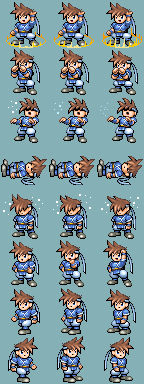
Here is an example of an XML file. This describes a "battle charset" tileset borrowed from RPG Maker 2003, which contains 3 tiles of animation for a number of different poses that the character strikes while in battle.
<?xml version="1.0" encoding="utf-8"?> <!-- The graphic for this, hero-battle.png, was taken from RPG Maker 2 +003 for demonstration purposes only. RPG Maker 2003 is copyright (C) Enterbrain, Inc. --> <tileset> <!-- Tile Definitions --> <layout type="tiles" size="48x48"> <!-- Using a magic spell or item --> <tile x="0" y="0" id="magic-1" /> <tile x="1" y="0" id="magic-2" /> <tile x="2" y="0" id="magic-3" /> <!-- Defending --> <tile x="0" y="1" id="defend-1" /> <tile x="1" y="1" id="defend-2" /> <tile x="2" y="1" id="defend-3" /> <!-- Being hit --> <tile x="0" y="2" id="hit-1" /> <tile x="1" y="2" id="hit-2" /> <tile x="2" y="2" id="hit-3" /> <!-- Dead --> <tile x="0" y="3" id="dead-1" /> <tile x="1" y="3" id="dead-2" /> <tile x="2" y="3" id="dead-3" /> <!-- Poisoned --> <tile x="0" y="4" id="sick-1" /> <tile x="1" y="4" id="sick-2" /> <tile x="2" y="4" id="sick-3" /> <!-- Victory --> <tile x="0" y="5" id="win-1" /> <tile x="1" y="5" id="win-2" /> <tile x="2" y="5" id="win-3" /> <!-- Walking Left --> <tile x="0" y="6" id="left-1" /> <tile x="1" y="6" id="left-2" /> <tile x="2" y="6" id="left-3" /> <!-- Walking Right --> <tile x="0" y="7" id="right-1" /> <tile x="1" y="7" id="right-2" /> <tile x="2" y="7" id="right-3" /> </layout> <!-- Animation Definitions --> <layout type="animation" id="magic" speed="200"> <tile>magic-1</tile> <tile>magic-2</tile> <tile>magic-3</tile> </layout> <layout type="animation" id="defending" speed="200"> <tile>defend-1</tile> <tile>defend-2</tile> <tile>defend-3</tile> </layout> <layout type="animation" id="hit" speed="200"> <tile>hit-1</tile> <tile>hit-2</tile> <tile>hit-3</tile> </layout> <layout type="animation" id="dead" speed="200"> <tile>dead-1</tile> <tile>dead-2</tile> <tile>dead-3</tile> </layout> <layout type="animation" id="sick" speed="200"> <tile>sick-1</tile> <tile>sick-2</tile> <tile>sick-3</tile> </layout> <layout type="animation" id="win" speed="200"> <tile>win-1</tile> <tile>win-2</tile> <tile>win-3</tile> </layout> <layout type="animation" id="left" speed="200"> <tile>left-1</tile> <tile>left-2</tile> <tile>left-3</tile> </layout> <layout type="animation" id="right" speed="200"> <tile>right-1</tile> <tile>right-2</tile> <tile>right-3</tile> </layout> </tileset>
The distribution comes with a handful of tilesets for demonstration purposes, and a script that extracts all the tiles into their own individual images, and finally a script that demonstrates animations. This uses Perl/Tk and loops through all the animations in a tileset.
And finally, the Perl module code:
package Image::Tileset; use strict; use warnings; use Image::Magick; use XML::Simple; use Data::Dumper; our $VERSION = '0.01'; =head1 NAME Image::Tileset - A tileset loader. =head1 SYNOPSIS use Image::Tileset; my $ts = new Image::Tileset ( image => "my-tileset.png", xml => "my-tileset.xml", ); open (OUT, ">grass.png"); binmode OUT; print OUT $ts->tile("grass"); close (OUT); =head1 DESCRIPTION Image::Tileset is a simple tileset image loader. The preferred usage i +s to have an XML description file alongside the tileset image that describes how + the tiles are to be sliced up. The module supports "simple" tilesets (where all tiles have a uniform +width and height, though they don't need to begin at the top left corner of the +image) as well as "fixed" tilesets (where you need to specify the exact pixel + coords of every tile). It also supports the management of animations for your tiles (but not +the means to display them; this is left up to your front-end code. There is a de +mo that uses Perl/Tk to give you an idea how to do this). =head1 SPECIFICATION FILE Tileset images are paired with a "specification file," which describes + how the image is to be sliced up into the different tiles. The spec file is usually an XML document, and it's read with L<XML::Si +mple|XML::Simple>. If you wish, you can also send the spec data as a Perl data structure, + skipping the XML part. An example XML file is as follows, and shows all the capabilities of t +he spec file markup: <?xml version="1.0" encoding="utf-8"?> <tileset> <!-- The simplest form: the uniform tile set. In this case, all the t +iles are 32x32 pixels large and the first tile is in the top left corner +of the image, at pixel coordinate 0,0 --> <layout type="tiles" size="32x32" x="0" y="0"> <!-- Within a "tiles" layout, X and Y refer to the "tile coordinate +", not the "pixel coordinate". So, the top left tile is 0,0 and the o +ne to the right of it is 1,0 (even though its pixel coordinate would + be 32,0). The module takes care of this all for you!) Each tile needs a unique ID, called the "tile id". --> <tile x="0" y="0" id="grass" /> <tile x="1" y="0" id="sand" /> <tile x="2" y="0" id="dirt" /> <!-- We have three "water" tiles that we intend to animate later, b +ut each one still needs its own unique ID! --> <tile x="0" y="1" id="water-1" /> <tile x="1" y="1" id="water-2" /> <tile x="2" y="1" id="water-3" /> </layout> <!-- In addition to simple grid-based tiles, you can also specify pix +el coordinates directly. Use the "fixed" layout for this. --> <layout type="fixed"> <!-- In fixed layout, you need to specify 4 pixel coordinates for w +here the tile appears in the image: x1,y1,x2,y2. --> <tile x1="96" y1="0" x2="128" y2="96" id="avatar" /> </layout> <!-- For animations, you need to give the animation a unique ID and t +hen tell it which tiles (by their IDs) go into the animation. The "s +peed" attribute controls how fast the animation plays by setting the d +elay (in milliseconds) until the next tile should be shown. --> <layout type="animation" id="water" speed="200"> <tile>water-1</tile> <tile>water-2</tile> <tile>water-3</tile> <tile>water-2</tile> </layout> </tileset> See the examples in the C<demo/> folder for more information. =head1 METHODS =head2 new (hash options) Create a new C<Image::Tileset> object. Options include: bool debug: Debug mode (prints stuff to the terminal on STDERR) string xml: Path to an XML spec file that describes the image. hash spec: Spec data in Perl data structure form (skip XML file) +. string image: Path to the image file. =cut sub new { my $class = shift; my $self = { debug => 0, # Debug mode xml => '', # XML file spec => [], # Spec data (XML data in Perl form) image => '', # Image file magick => undef, # Image::Magick object error => '', # Last error state tiles => {}, # Tile positions in tileset animations => {}, # Animation information @_, }; bless ($self,$class); $self->{magick} = Image::Magick->new; # If given an image, load it. if (length $self->{image}) { $self->image ($self->{image}); } # If given an XML file, load it. if (length $self->{xml}) { $self->xml ($self->{xml}); $self->{xml} = ''; } # If given a spec, load it. if (ref($self->{spec}) eq "ARRAY" && scalar @{$self->{spec}} > 0) +{ $self->refine ($self->{spec}); $self->{spec} = []; } return $self; } sub debug { my ($self,$line) = @_; return unless $self->{debug}; print STDERR "$line\n"; } =head2 void error () Print the last error message given. Example: $tileset->loadImage("myfile.png") or die $tileset->error; =cut sub error { my ($self,$error) = @_; if (defined $error) { $self->{error} = $error; } return $self->{error}; } =head2 bool image (string image) Load an image file with C<Image::Magick>. Returns 1 on success, undef on error. =cut sub image { my ($self,$image) = @_; $self->debug("Attempting to load image file from $image"); # Exists? if (!-e $image) { $self->error("Can't load image file $image: file not found!"); return undef; } # Load it with Image::Magick. my $x = $self->{magick}->Read($image); warn $x if $x; return 1; } =head2 bool xml (string specfile) Load a specification file from XML. Returns 1 on success, undef on error. =cut sub xml { my ($self,$file) = @_; $self->debug("Attempting to load XML file from $file"); # Exists? if (!-e $file) { $self->error("Can't load XML spec file $file: file not found!" +); return undef; } # Load it with XML::Simple. my $o_xs = new XML::Simple ( RootName => 'tileset', ForceArray => 1, KeyAttr => 'id', ); my $xs = $o_xs->XMLin($file); # Does it look good? if (!exists $xs->{layout}) { $self->error("No layout information was found in XML spec file +!"); return undef; } # Refine it. We want pixel coords of every named tile. $self->refine($xs->{layout}) or return undef; return 1; } =head2 bool refine (array spec) Refines the specification data. The spec describes how the image is cu +t up; C<refine()> goes through that and stores the exact pixel coordinates o +f every tile named in the spec, for quick extraction when the tile is wanted. This method is called automatically when an XML spec file is parsed. I +f you pass in a C<spec> during the call to C<new()>, this method will be cal +led automatically for your spec. If you want to load a spec directly after + you've created the object, you can call C<refine()> directly with your new sp +ec. =cut sub refine { my ($self,$spec) = @_; # It must be an array. if (ref($spec) ne "ARRAY") { $self->error("Spec file must be an array of layouts!"); return undef; } # Clear the currently loaded data. delete $self->{tiles}; delete $self->{animations}; $self->{tiles} = {}; $self->{animations} = {}; # Go through the layouts. $self->debug("Refining the specification..."); foreach my $layout (@{$spec}) { my $type = lc($layout->{type}); # Supported layout types: # tiles # fixed # animation if ($type eq "tiles") { # How big are the tiles? if ($layout->{size} !~ /^\d+x\d+$/) { $self->error("Syntax error in spec: 'tiles' layout but + no valid tile 'size' set!"); return undef; } my ($width,$height) = split(/x/, $layout->{size}, 2); $self->debug("Looking for 'tiles' layout; tile dimensions +are $width x $height"); # Offset coords. my $x = $layout->{x} || 0; my $y = $layout->{y} || 0; # Collect the tiles. foreach my $id (keys %{$layout->{tile}}) { # Tile coordinates. my $tileX = $layout->{tile}->{$id}->{x}; my $tileY = $layout->{tile}->{$id}->{y}; # Pixel coordinates. my $x1 = $x + ($width * $tileX); my $x2 = $x1 + $width; my $y1 = $y + ($height * $tileY); my $y2 = $y1 + $height; $self->debug("Found tile '$id' at pixel coords $x1,$y1 +,$x2,$y2"); # Store it. $self->{tiles}->{$id} = [ $x1, $y1, $x2, $y2 ]; } } elsif ($type eq "fixed") { # Fixed is easy, we already have all the coords we need. $self->debug("Looking for 'fixed' tiles"); foreach my $id (keys %{$layout->{tile}}) { # Pixel coordinates. my $x1 = $layout->{tile}->{$id}->{x1}; my $y1 = $layout->{tile}->{$id}->{y1}; my $x2 = $layout->{tile}->{$id}->{x2}; my $y2 = $layout->{tile}->{$id}->{y2}; $self->debug("Found tile '$id' at pixel coords $x1,$y1 +,$x2,$y2"); # Store it. $self->{tiles}->{$id} = [ $x1, $y1, $x2, $y2 ]; } } elsif ($type eq "animation") { # Animations just have a list of tiles involved and some m +eta info. my $id = $layout->{id}; # Name of the animation sprite my $speed = $layout->{speed} || 500; # Speed of animation, + in milliseconds $self->{animations}->{$id} = { speed => $speed, tiles => $layout->{tile}, }; } else { warn "Unknown layout type '$type'!"; } } } =head2 data tiles () Return the tile coordinate information. In array context, returns a li +st of the tile ID's. In scalar context, returns a hash reference in the followin +g format: { 'tile-id' => [ x1, y1, x2, y2 ], ... }; =cut sub tiles { my ($self) = @_; return wantarray ? sort keys %{$self->{tiles}} : $self->{tiles}; } =head2 data animations () Return the animation information. In array context, returns a list of +the animation ID's. In scalar context, returns a hash reference in the fol +lowing format: { 'animation-id' => { speed => '...', tiles => [ 'tile-id', ... ], }, }; =cut sub animations { my ($self) = @_; return wantarray ? sort keys %{$self->{animations}} : $self->{anim +ations}; } =head2 bin tile (string id) Get the binary data of one of the tiles, named C<id>, from the origina +l tileset. Returns undef on error. =cut sub tile { my ($self,$id) = @_; # Tile exists? if (!exists $self->{tiles}->{$id}) { $self->error("No tile named '$id' in tileset!"); return undef; } # Slice the image. my $slice = $self->slice ($id); my $png = $slice->ImageToBlob(); return $png; } =head2 data animation (string id) Get the animation information about a specific animation ID. Returns data in the format: { speed => '...', tiles => [ ... ], }; Returns undef on error. =cut sub animation { my ($self,$id) = @_; # Animation exists? if (!exists $self->{animations}->{$id}) { $self->error("No animation named '$id' in tileset!"); return undef; } return $self->{animations}->{$id}; } =head2 ImageMagick slice (string id) Returns an C<Image::Magick> object that contains the sliced tile from +the original tileset. This is mostly for internal use only. =cut sub slice { my ($self,$id) = @_; # Tile exists? if (!exists $self->{tiles}->{$id}) { $self->error("No tile named '$id' in tileset!"); return undef; } # Get the dimensions of the tile. my $width = $self->{tiles}->{$id}->[2] - $self->{tiles}->{$id}->[ +0]; # x2 - x1 my $height = $self->{tiles}->{$id}->[3] - $self->{tiles}->{$id}->[ +1]; # y2 - y1 if ($width < 1 || $height < 1) { $self->error("Tile '$id' has impossible dimensions: $width x $ +height"); return undef; } my $dims = $width . 'x' . $height; # Make a new ImageMagick object. my $slice = $self->{magick}->Clone(); # Crop it. my $x = $self->{tiles}->{$id}->[0]; my $y = $self->{tiles}->{$id}->[1]; my $crop = $dims . "+$x+$y"; $self->debug("Cropping image clone to $crop for tile $id"); $slice->Crop($crop); return $slice; } =head1 SEE ALSO L<Image::Magick|Image::Magick>, which powers this module's graphics ha +ndling. L<XML::Simple|XML::Simple>, which powers this module's XML parsing. =head1 CHANGES 0.01 Fri Jan 15 2010 - Initial release. =head1 COPYRIGHT The tileset graphics included for demonstration purposes are from RPG +Maker 2003 and are copyright (C) Enterbrain. Code written by Noah Petherbridge, http://www.kirsle.net/ This library is free software; you can redistribute it and/or modify i +t under the same terms as Perl itself, either Perl version 5.10.0 or, at your +option, any later version of Perl 5 you may have available. =cut 1;
Update (about the Tk demo): I changed the "animations()" method so it doesn't accept an animation id, so it broke the demo script. To fix it, change line 40 of tk-animate.pl so the function name is "animation" and not "animations". I've repackaged the module so the link above has the fixed version now.
Questions or feedback? I figure others might find this useful so I submitted it here for review before sending it to CPAN.
|
|---|
| Replies are listed 'Best First'. | |
|---|---|
|
Re: New Module - Image::Tileset
by zentara (Cardinal) on Jan 16, 2010 at 12:28 UTC | |
by Kirsle (Pilgrim) on Jan 16, 2010 at 23:33 UTC | |
|
Re: New Module - Image::Tileset
by Kirsle (Pilgrim) on Jan 19, 2010 at 00:50 UTC | |
by Anonymous Monk on Jan 19, 2010 at 01:24 UTC | |
|
Re: New Module - Image::Tileset
by Kirsle (Pilgrim) on Jan 22, 2010 at 03:30 UTC | |
|
Re: New Module - Image::Tileset
by SuicideJunkie (Vicar) on Jan 21, 2010 at 21:02 UTC |