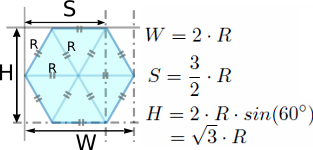
A monk asked me if I had an Tk example of a clickable hex tiled grid. I googled for it, and to my surprise, hexagonal grid examples for Perl were not to be found. So I made one for a Tk canvas, but thought why not not challenge other GUI users to make one for their favorite GUI, to give future tiled hex grid seekers a jump start, no matter which GUI toolkit they use.

The basic math is simple, as seen in hex_single_cell. The challenge specification is to accept a prescribed number of rows and columns, and a hex cell width, at its widest span, with the cell in the non-rotated position. Bindings should be made so that cells are identified and clickable.

Update 5 May,2012: Fixed a small cell xposition logic error.

#!/usr/bin/perl use warnings; use strict; use Tk; # simplest hex example where the cell height = sqrt(3) cell width # and all cells vertically oriented like a honeycomb # W = 2 * r # s = 1.5 * r # H = 2 * r * sin(60 degrees) = sqrt(3) * r # therefore # r = W/2 and we can compute our polygon's points # # set number of cells in x and y direction my ( $num_cells_x , $num_cells_y) = (50,50); # set rectangular cell and width and compute height my $cwidth = 40; my $cheight = sqrt(3) * $cwidth; # compute canvas size required my ($canvasWidth, $canvasHeight) = ($num_cells_x * $cwidth, $num_cells_y * $cheight); my $mw = MainWindow->new(); $mw->geometry('500x500+300+300'); my $sc = $mw->Scrolled('Canvas', -bg => 'black', -width => $canvasWidth, -height => $canvasHeight, -scrollbars => 'osoe', -scrollregion => [ 0, 0, $canvasWidth, $canvasHeight ], )->pack; my $canvas =$sc->Subwidget("canvas"); my ($x, $y, $r , $s , $h, $w, $diff, $row, $col ); $r = $cwidth/2; $w = $cwidth; $h = sqrt(3) * $r; $s = 1.5 * $r; $diff = $w - $s; $row = 0; $col = 0; # $x and $y are center of mass locations for ($y = 0; $y < $canvasHeight; $y+= $h/2){ for ($x = 0; $x < $canvasWidth; $x+= (2*$r + $s - $diff) ){ my $shift = 0; my $color; # toggles row colors and spacings if ($row % 2){ $color = '#FFAAAA'; $shift = $s ; } else{ $color = '#AAAAFF'} #print "$color\n"; my $x0 = $x - $r - $shift; my $y0 = $y; my $x1 = $x0 + $diff; my $y1 = $y0 - $h/2; my $x2 = $x0 + $s; my $y2 = $y0 - $h/2; my $x3 = $x0 + 2*$r; my $y3 = $y; my $x4 = $x0 + $s; my $y4 = $y0 + $h/2; my $x5 = $x1; my $y5 = $y0 + $h/2; my $x6 = $x0; # close up to starting point my $y6 = $y0; # small offset bug fix # account for $shift affecting x position # xpos != x my $xpos = $x0 + $r; my $hexcell = $canvas->createPolygon ($x0, $y0, $x1, $y1, $x2, $y2,$x3, $y3,$x4, $y4,$x5, $y5, $x6, $y6, + -fill => $color, -activefill => '#CCFFCC', -tags =>['hexcell',"row.$row","col.$col", "po +sx.$xpos", "posy.$y" ], -width => 1, -outline => 'black', ); $col++; } $row++; $col = 0; # reset column } $sc->bind('hexcell', '<Enter>', \&enter ); $sc->bind("hexcell", "<Leave>", \&leave ); $sc->bind("hexcell", "<1>", \&left_click ); MainLoop; sub left_click { my ($canv) = @_; my $id = $canv->find('withtag', 'current'); my @tags = $canv->gettags($id); print "@tags\n"; $canv->itemconfigure($id, -fill=>'#44FF44'); } sub enter { my ($canv) = @_; my $id = $canv->find('withtag', 'current'); my @tags = $canv->gettags($id); print "@tags\n"; } sub leave{ my ($canv) = @_; print "leave\n"; }

I'm not really a human, but I play one on earth.
Old Perl Programmer Haiku ................... flash japh

Replies are listed 'Best First'.
Re: GUI challenge: clickable hexagonal tiled grid
by tobyink (Canon) on May 05, 2012 at 14:04 UTC

    These days I tend to prefer using the Web over building GUIs.

    perl -E'sub Monkey::do{say$_,for@_,do{($monkey=[caller(0)]->[3])=~s{::}{ }and$monkey}}"Monkey say"->Monkey::do'
      Looks nice, but how do I produce the grid? Can you put this on a http server so we can see how it works?

      I'm not really a human, but I play one on earth.
      Old Perl Programmer Haiku ................... flash japh

        It's a PSGI application, so it can be run via a few lines of Apache (mod_perl) configuration, or a three line CGI wrapper script, or save it as "app.psgi" and run plackup app.psgi.

        I've gone the mod_perl route here: http://buzzword.org.uk/2012/hextiles/

        PS I'll point out that I stole the idea (though not the exact technique) from Tantek Çelik. His is better.

        perl -E'sub Monkey::do{say$_,for@_,do{($monkey=[caller(0)]->[3])=~s{::}{ }and$monkey}}"Monkey say"->Monkey::do'
Re: GUI challenge: clickable hexagonal tiled grid--- Goo::Canvas version
by zentara (Cardinal) on May 27, 2012 at 12:50 UTC
    Just to demonstrate the superiority of the Goo::Canvas , here is a Goo version of the hex tile grid. It supports rotation, zoom, groups, and semi-transparency.

    But to still pat Tk on the back, as still having some better features, it is very hard to make the Goo's individual tiles clickable, or even change their color. This is because Goo dosn't actually have a polygon item ( as does Tk). Goo has "polylines", which are hard to setup enter, leave, and mouse click bindings upon. One probably would have to create a custom Goo item, to achieve these bindings. Once again, Tk is definitely easier to use, although it may not look as fancy.

    #!/usr/bin/perl use strict; use warnings; use Gtk2 '-init'; use Goo::Canvas; use Glib qw(TRUE FALSE); my $mw = Gtk2::Window->new('toplevel'); $mw->set_default_size( 400, 300 ); $mw->signal_connect (destroy => sub { Gtk2->main_quit }); my $vbox = Gtk2::VBox->new(0,0); $mw->add ($vbox); my $swin = Gtk2::ScrolledWindow->new; $swin->set_shadow_type('in'); my $ha1 = $swin->get_hadjustment; my $va1 = $swin->get_vadjustment; my $canvas = Goo::Canvas->new(); my ($cw,$ch) = (600, 450); $canvas->set_size_request($cw, $ch); my($xbound,$ybound) = (1000,1000); $canvas->set_bounds(0, 0, $xbound, $ybound); my ($cx,$cy) = ($xbound/2,$ybound/2); my $root = $canvas->get_root_item(); #root group # make a group for the hexagon tiles my $group = Goo::Canvas::Group->new($root); my $g_cx = $cw/2; my $g_cy = $ch/2; my $white = Gtk2::Gdk::Color->new (0xFFFF,0xFFFF,0xFFFF); my $green = Gtk2::Gdk::Color->new (0x0000,0xFFFF,0x0000); my $black = Gtk2::Gdk::Color->new (0x0000,0x0000,0x0000); $canvas->modify_base('normal',$white); $vbox->pack_start ($swin, 1,1,1); $swin->add($canvas); # Zoom my $hbox = Gtk2::HBox->new(0, 4); $vbox->pack_start($hbox, 0, 0, 0); $hbox->show; my $z = Gtk2::Label->new("Zoom:"); $hbox->pack_start($z, 0, 0, 0); $z->show; my $zadj = Gtk2::Adjustment->new(1, 0.05, 100, 0.05, 0.5, 0.0); my $zsb = Gtk2::SpinButton->new($zadj, 0.1, 2); $zadj->signal_connect("value-changed", \&zoom_changed, $canvas); $zsb->set_editable(0); $hbox->pack_start($zsb, 1, 1, 10); $zsb->show; # Rotate my $r = Gtk2::Label->new("Rotate:"); $hbox->pack_start($r, 0, 0, 0); $r->show; my $vboxb = Gtk2::VBox->new(0,0); $hbox->pack_start($vboxb, 0, 0, 0); $vboxb->show; my $btn_rota = Gtk2::Button->new_from_stock('+'); my $btn_rotb = Gtk2::Button->new_from_stock('-'); $btn_rota->signal_connect("clicked", \&rotate, 1 ); $btn_rotb->signal_connect("clicked", \&rotate, -1 ); $vboxb->pack_start($btn_rota, 0, 0, 0); $vboxb->pack_start($btn_rotb, 0, 0, 0); $btn_rota->show; $btn_rotb->show; # Create PDF + my $bpdf = Gtk2::Button->new_with_label('Write PDF'); + $hbox->pack_start($bpdf, FALSE, FALSE, 0); + $bpdf->show; + $bpdf->signal_connect("clicked", \&write_pdf_clicked, $canvas); + # fixes runaway zoom and gives smoother zoom control $canvas->signal_connect (event => \&event_handler); $canvas->can_focus(1); $canvas->grab_focus($root); &fill_canvas(); $group->raise(); # raise the hexgrid group above $root group # ie to put sample text below hexgrid $mw->show_all; Gtk2->main; exit 0; sub zoom_changed { my ($adj, $canvas) = @_; $canvas->set_scale($adj->get_value); # $canvas->scroll_to (0,0); # adjust scroll here after zoom if desi +red return 0; } sub rotate { my ($button, $rotate) = @_; # print "rotate $rotate\n"; $group->rotate ($rotate, $g_cx, $g_cy); return 0; } sub fill_canvas{ my $text = Goo::Canvas::Text->new( $root, "Perl", 340, 170, -1, 'center', 'font' => 'Sans 64', "fill-color" => "black", ); # set number of cells in x and y direction my ( $num_cells_x , $num_cells_y) = (50,50); # set rectangular cell and width and compute height my $cwidth = 40; my $cheight = sqrt(3) * $cwidth; # compute canvas size required my ($canvasWidth, $canvasHeight) = ($num_cells_x * $cwidth, $num_cells_y * $cheight); my ($x, $y, $r , $s , $h, $w, $diff, $row, $col ); $r = $cwidth/2; $w = $cwidth; $h = sqrt(3) * $r; $s = 1.5 * $r; $diff = $w - $s; $row = 0; $col = 0; # $x and $y are center of mass locations for ($y = 0; $y < $canvasHeight; $y+= $h/2){ for ($x = 0; $x < $canvasWidth; $x+= (2*$r + $s - $diff) ){ my $shift = 0; my $color; # toggles row colors and spacings if ($row % 2){ $color = 0xffb37180; $shift = $s ; } else{ $color = 0x3cb37180} #print "$color\n"; my $x0 = $x - $r - $shift; my $y0 = $y; my $x1 = $x0 + $diff; my $y1 = $y0 - $h/2; my $x2 = $x0 + $s; my $y2 = $y0 - $h/2; my $x3 = $x0 + 2*$r; my $y3 = $y; my $x4 = $x0 + $s; my $y4 = $y0 + $h/2; my $x5 = $x1; my $y5 = $y0 + $h/2; my $x6 = $x0; # close up to starting point my $y6 = $y0; # account for $shift affecting x position # xpos != x my $xpos = $x0 + $r; my $pts_ref = [$x0,$y0,$x1,$y1,$x2,$y2,$x3,$y3,$x4,$y4,$x5,$y5,$x6,$y6 +]; my $line = Goo::Canvas::Polyline->new( $group, TRUE, $pts_ref, 'stroke-color' => 'black', 'line-width' => 1, 'fill-color-rgba' => $color, ); $col++; } $row++; $col = 0; # reset column } } sub write_pdf_clicked { my ($but, $canvas) = @_; print "Write PDF...\n"; my $scale = $zadj->get_value; print "scale->$scale\n"; my $surface = Cairo::PdfSurface->create("$0-$scale.pdf", $scale*$cw, $scale*$ch); my $cr = Cairo::Context->create($surface); # needed to save scaled version $cr->scale($scale, $scale); $canvas->render($cr, undef, 1); $cr->show_page; print "done\n"; return TRUE; } sub event_handler{ my ( $widget, $event ) = @_; # print $widget ,' ',$event->type,"\n"; my $scale = $zadj->get_value; # print "scale->$scale\n"; if ( $event->type eq "button-press" ) { my ($x,$y) = ($event->x,$event->y); print "$x $y\n"; } if ( $event->type eq "button-release" ) { } if ( $event->type eq "focus-change" ) { return 0; } if ( $event->type eq "expose" ) { return 0; } Gtk2->main_iteration while Gtk2->events_pending; return 1; } __END__

    I'm not really a human, but I play one on earth.
    Old Perl Programmer Haiku ................... flash japh
Re: GUI challenge: clickable hexagonal tiled grid
by b4swine (Pilgrim) on May 31, 2012 at 13:11 UTC

    I remember doing a hex cell once (as part of a hex maze), I found that using 3 dimensions made my problem a lot easier than two, even though we are working only in 2d.

    Imagine vectors I = (1,0), J = (1/2,sqrt(3)/2) and K = (-1/2, sqrt(3)/2), which is really unit vectors at 0, 60 and 120 degrees. Every center of a hex is identified by three integers (a,b,c) which correspond to the 2d coordinates aI+bJ+cK. To find the six neighbors of (a,b,c), just add or subtract one from any of the a, b or c.

    I was surprised but using this system made my code a lot easier to understand, and write.

      Yes sir, vector math makes things alot easier, once you manage to learn it :-) especially in 3d space. Matrix transformations are the big thing now.

      I'm not really a human, but I play one on earth.
      Old Perl Programmer Haiku ................... flash japh