in reply to Prima: How to get a "table" layout?

I haven't used Prima and my Perl version is so ancient that I couldn't easily get that library running on my machine. I have constructed a Tk way of doing this as shown below.

In Tk there is a "Frame" widget which usually has invisible borders. Things inside of a Frame widget get grouped. In the example below, there is a text label on the left; all of them are stuffed into a Frame. And then within that Frame, they are right justified and anchored to the east. The Frame will expand to accommodate the longest label.

In Prima, I see that there is a FrameSet gizmo. This may get you similar function to a Tk Frame.

Run this and let us know how close it is to your requirements.

Added:
I did set one width manually, the input field width, I forget what the units are but you can play around with it.

se warnings; use strict; use Tk; my $mw = MainWindow->new(); $mw->configure(-title=> "Some Title"); $mw->minsize(qw(700 200)); my $mainDataFrame = $mw->Frame()->pack(-side=>'top', -fill=>'x'); my $labelFrame = $mainDataFrame->Frame->pack(-side=>'left'); my $dataEntryFrame = $mainDataFrame->Frame->pack(-side=>'left'); my $unitsFrame = $mainDataFrame->Frame->pack(-side=>'left'); my $refreshRate; my $spectralRes; my $showSpectrumHz; my @tableConfig = ( ['Refresh rate:','60',\$refreshRate,'FPS'], ["Spectral resolution",'10',\$spectralRes,'Hz'], ["Show spectrum up to",'5000',\$showSpectrumHz,'Hz +']); for my $rowRef ( @tableConfig ) { $labelFrame->Label(-text => "$rowRef->[0]", -anchor=>'e', -justify => 'right')->pack(-side=>'top', -fill +=> 'x'); my $dataRef = $rowRef->[2]; # put default value into textvariable $$dataRef = $rowRef->[1]; $dataEntryFrame->Entry(-width => 8, -textvariable => $dataRef, )->pack(-side =>'top', -fill => 'x'); $unitsFrame->Label(-text => "$rowRef->[3]", -anchor=>'w', -justify => 'left')->pack(-side=>'top', -fill = +> 'x'); } MainLoop();

Replies are listed 'Best First'.
Re^2: Prima: How to get a "table" layout?
by haj (Vicar) on Jan 19, 2025 at 10:15 UTC

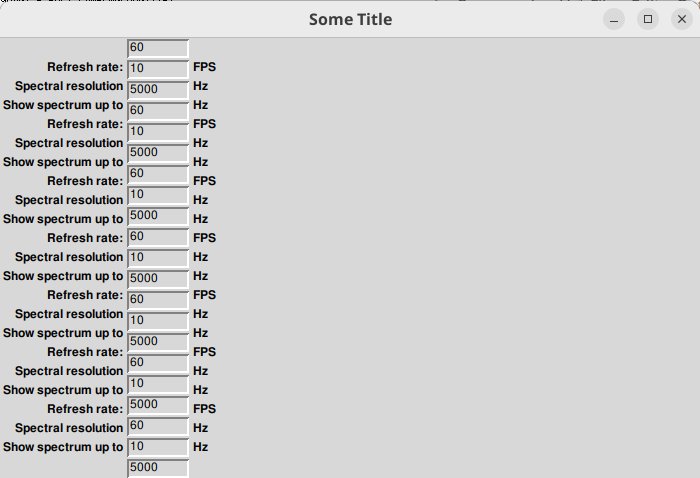
    Thanks for that example, but sorry, it is not what I am looking for. The Tk layout has nicely aligned columns, but now the lines are misaligned: A Tk::Entry is slightly higher than a label (same for Prima). It is visible with three lines, but becomes really bad for a realistic number of configuration variables and off by a whole line for ~20 variables.

    BTW: Prima::FrameSet is a different thing. In Prima I use plain Prima::Widget for containers.

      In Tk I would use the 'grid' geometry manager, like the following example.

      I don't have Prima on my machine, but I noticed in CPAN that there is a Prima::Grid. Perhaps it is similar.

      #!/usr/bin/perl use strict; # https://perlmonks.org/?node_id=11163718 use warnings; use Tk; my $mw = MainWindow->new(); $mw->configure(-title=> "Configuration"); my ($refreshRate, $spectralRes, $showSpectrumHz); my @tableConfig = ( ['Refresh rate:','60',\$refreshRate,'FPS'], ["Spectral resolution",'10',\$spectralRes,'Hz'], ["Show spectrum up to",'5000',\$showSpectrumHz,'Hz +']); $mw->Button(-text => 'Done', -command => sub{ $mw->destroy }, )->pack(-side => 'bottom', -fill => 'x'); my $table = $mw->Frame->pack; my $row = 1; for ( @tableConfig ) { my ($label, $value, $variable, $units) = @$_; $table->Label(-text => $label, )->grid(-row => $row, -column => 1, -sticky => 'e'); $$variable = $value; $table->Entry(-textvariable => $variable, -width => 8, -justify => 'right', )->grid(-row => $row, -column => 2, -sticky => 'ew'); $table->Label(-text => $units, )->grid(-row => $row, -column => 3, -sticky => 'w'); $row++; } MainLoop(); use Text::ASCIITable; my $t = Text::ASCIITable->new({ headingText => 'Configuration' }); $t->setCols(qw(Item Value Units)); $t->addRow( [ map [ $_->[0], ${$_->[2]}, $_->[3] ], @tableConfig ] ); print $t;
      How interesting. This can be one of the problems with GUI's. On My machine, all lines look just fine even with 20 rows on my display. I am unable to reproduce your symptoms. This perhaps could have something to do with the font's that your machine is using? Is anybody else here able to reproduce Haj's symptom?

      Added: I am using default fonts. Are you running my code verbatim as shown? This could be an issue if you are using UTF-8 or unicode. You could try explicitly configuring the font and font size for each label and entry widget. These widgets are designed with exactly this "label: Entry"side by side usage in mind. My lines line up to the exact pixel. There are other ways to do this. In Tk, there is TableMatrix which can produce a spreadsheet like appearance. I've used that with 2,000 rows.

      I am using 64 bit Perl 5.24 on Win10.

        I am aware that it might work somewhere. I wrote:

        I would also prefer not to count pixels for the line height, which might differ for different platforms (or fonts).

        Here's how it looks with ~20 lines on my Ubuntu 24.01 LTS: https://haraldjoerg.github.io/i/tk_table.png