First, you've got a test runner (runtests.pl) and you've got your test files (foo.t). It sounds like you want to attach a debugger to foo.t - whether you go through your test runner or not is probably uninteresting to you, since it's the test that you want to debug, not the test runner.
So a good thing to check is this: can you just run foo.t from the command line? "perl path/to/foo.t" should run the test for you. Maybe you need to specify a PERL5LIB, or use -I, to pick up project libraries. Once you've got your test running from the command line, outside of the debugger, then you can set it up to run under a debugger.
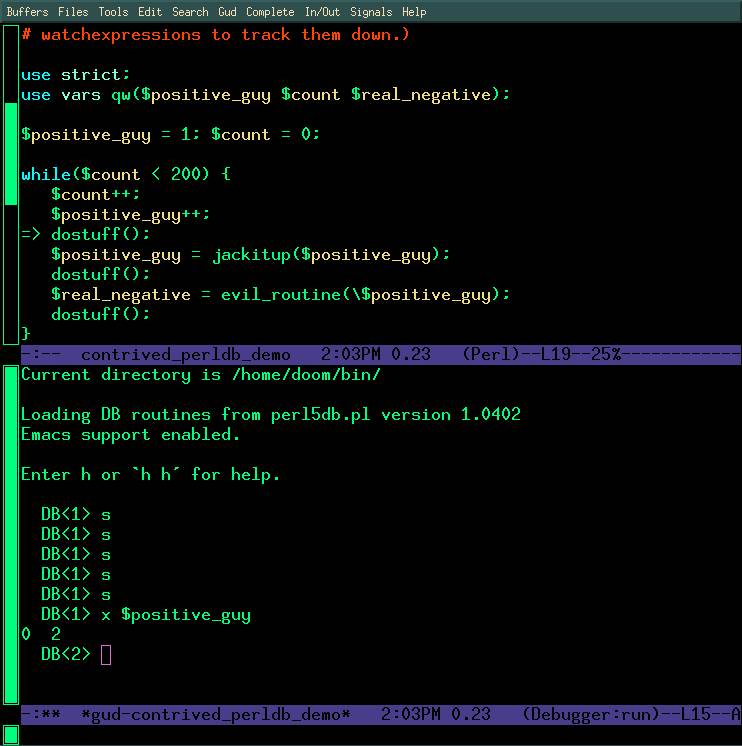
If you and I worked together, I'd sidestep part of your problem - which is that you want a debugger application on your Mac to connect to a remote debugging session on some Linux box. What I would do is: fire up emacs within the console (emacs -nw path/to/foo.t), set the filetype to perl (escape-x cperl-mode), and run the file under the debugger (escape-x perldb). Here's a screenshot of emacs debugging perl - this is pretty close to what I would see at this point: http://obsidianrook.com/devnotes/talks/perl_debugger/Images/emacs_perldb_big_color_screen.jpg
Obviously if you're not familiar with emacs then this is probably not a great solution for you. There is a VimDebug project, which claims to allow attaching vim to a perl debug session, but I've never gotten it to work for myself, though frankly I haven't tried much.
But where we are now is that you can run your test from the command line. And you can add the -d switch to your "run this test script" command line to enter into the unexceptional stock perl5db.pl interface. You should try that on your Linux dev server, just to ensure the next step will work.
Now what you need to do is:
- fire up the debugger on the remote server
- somehow attach a debugger from your Macbook to the remote debugging session
Komodo IDE comes with a remotely attachable perl5db.pl. Have a look at http://docs.activestate.com/komodo/4.4/debugperl.html and http://komodoide.com/download/ to find docs on how to start up the remote debugger on your Linux server, and to download Komodo to your Macbook.
Hope this helps. Getting your test running from the command line first, outside of your test runner; then getting the command line debugger to work, are both good first steps before you try the remote debugger attachment.
I'm more likely to see a reply on twitter (@belden) than here, ping me there if you have more questions on this thread.
In reply to Re: graphical debugger, in a unit-test environment?
by belden
in thread graphical debugger, in a unit-test environment?
by jae_63
| For: | Use: | ||
| & | & | ||
| < | < | ||
| > | > | ||
| [ | [ | ||
| ] | ] |