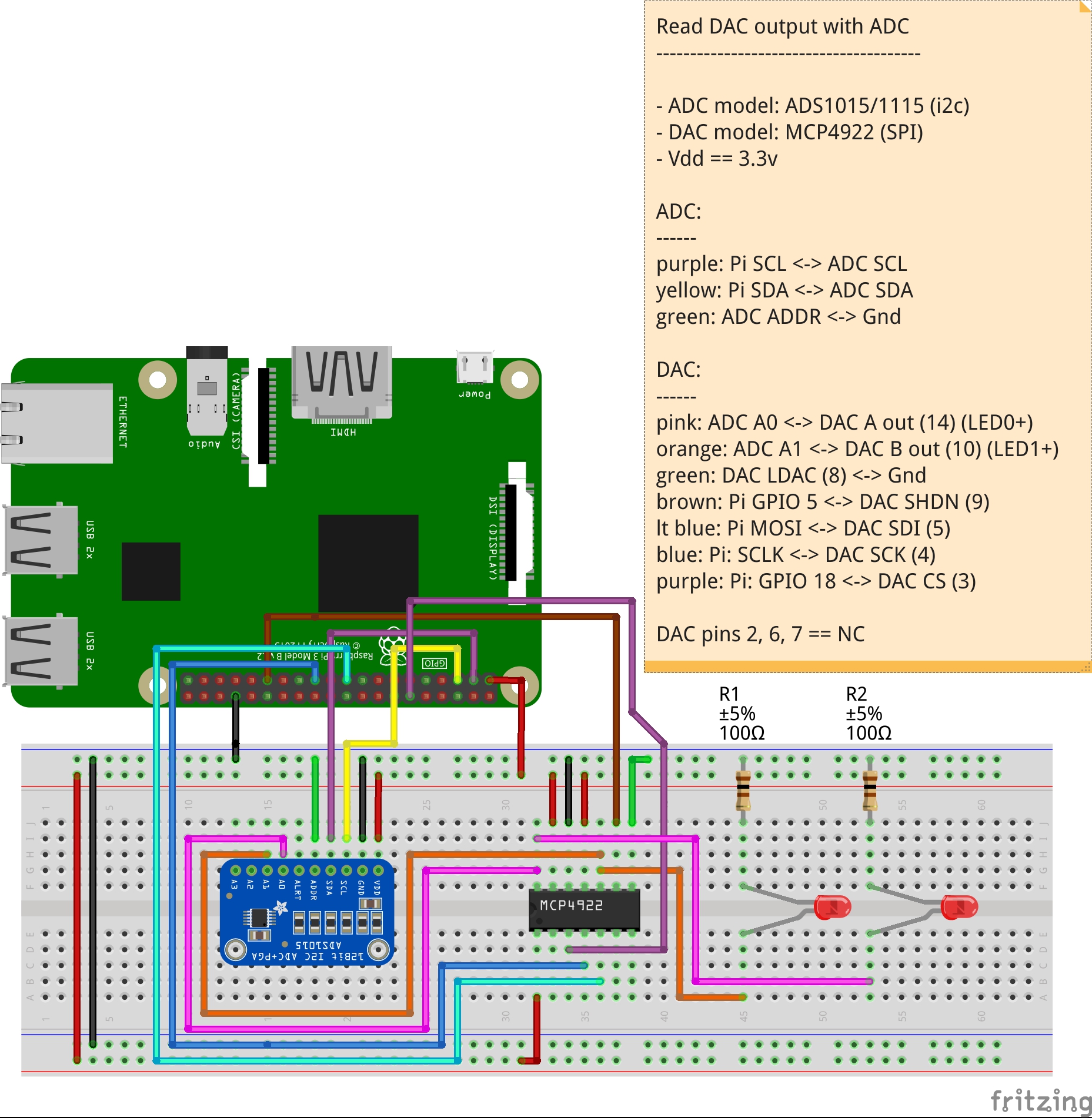
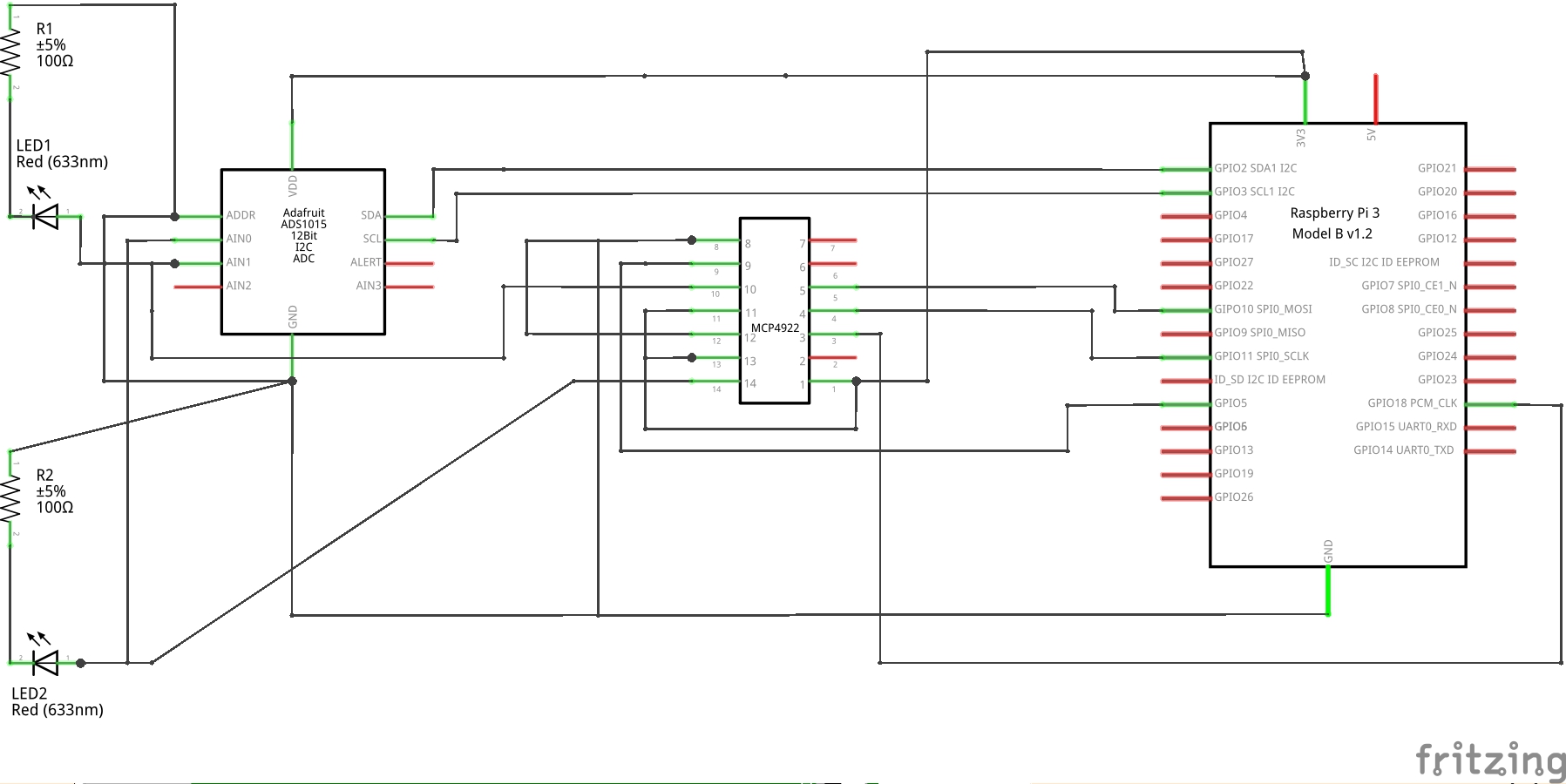
First full IC prototype using Perl, with the Bit::Manip software for bit banging, worked out quite well. Now I'm just finishing up the C code that will take over the work, and publish the distribution for the MCP4922 (well, the MCP49x2) digital to analog converters.
update: breadboard layout and schematic used for the prototype testing./update
After that's complete, I'll be making some of the suggested updates to Bit::Manip. Again, thanks for the feedback everyone!
use warnings; use strict; use feature 'say'; use Bit::Manip qw(:all); use RPi::WiringPi; use RPi::WiringPi::Constant qw(:all); my $spi_chan = 0; my $pi = RPi::WiringPi->new; my $adc = $pi->adc; my $spi = $pi->spi($spi_chan); my $cs_pin = $pi->pin(18); my $shdn_pin = $pi->pin(6); # light up some pins per the datasheet # device channel select (CS) to HIGH, in case the # device started it as LOW. In this case, we # bit-bang the CS pin, instead of using the # hardware SPI $cs_pin->mode(OUTPUT); $cs_pin->write(HIGH); # device 'shutdown' (SHDN) pin we'll tie to HIGH, # when tied to HIGH, means all DACs active $shdn_pin->mode(OUTPUT); $shdn_pin->write(HIGH); # show the current voltage output % on both DAC # channels before we begin say $adc->percent(0); say $adc->percent(1); # dac 0 say "\nDAC 0...\n"; dac_write(0, [0b1111, 0b11111111]); say "dacA: " . $adc->percent(0) . "%"; dac_write(0, [0b0111, 0b0]); say "dacA: " . $adc->percent(0) . "%"; dac_write(0, [0b0, 0b0]); say "dacA: " . $adc->percent(0) . "%"; # dac 1 say "\nDAC 1...\n"; dac_write(1, [0b1111, 0b11111111]); say "dacB: " . $adc->percent(1) . "%"; dac_write(1, [0b0111, 0b0]); say "dacB: " . $adc->percent(1) . "%"; dac_write(1, [0b0, 0b0]); say "dacB: " . $adc->percent(1) . "%"; sub dac_write { my ($dac, $data) = @_; die "\$dac param must be 0 or 1\n" if $dac != 0 && $dac != 1; # init the register my $register = [0, 0]; # DAC (bit 7) (a/b == 0/1) we're writing to $register->[0] = bit_set($register->[0], 7, 1, $dac); # BUFFERING (bit 6) == 0 $register->[0] = bit_set($register->[0], 6, 1, 0); # GAIN (bit 5) == 1 $register->[0] = bit_on($register->[0], 5); # SHDN (shutdown) (bit 4) == 1 $register->[0] = bit_set($register->[0], 4, 1, 1); # DATA (bits 3-0) $register->[0] = bit_set($register->[0], 0, 4, $data->[0]); say "byte1: ".bit_bin($register->[0]); # DATA byte 2 $register->[1] = bit_set($register->[1], 0, 8, $data->[1]); say "byte2: ".bit_bin($register->[1]); # drop chip select to LOW to start conversation with the DAC $cs_pin->write( LOW ); # write our bytes to the SPI bus $spi->rw($register, 2); # go HIGH to tell the IC we're done clocking in bits $cs_pin->write( HIGH ); } $pi->cleanup;
output:
0.00 0.00 DAC 0... byte1: 111111 byte2: 11111111 dacA: 99.94% byte1: 110111 byte2: 0 dacA: 43.76% byte1: 110000 byte2: 0 dacA: 0.00% DAC 1... byte1: 10111111 byte2: 11111111 dacB: 100.00% byte1: 10110111 byte2: 0 dacB: 43.70% byte1: 10110000 byte2: 0 dacB: 0.00%
In reply to Re^3: Bit string manipulation made easy with Bit::Manip
by stevieb
in thread Bit string manipulation made easy with Bit::Manip
by stevieb
| For: | Use: | ||
| & | & | ||
| < | < | ||
| > | > | ||
| [ | [ | ||
| ] | ] |